HONG

洪可欣

*

KO-HSIN

Web Front-end designer (UI / UX)
網頁前端設計師 (UI / UX)

設計時多考慮不同的角度Consider multiple angles in design

Ko is an experienced graphic designer and illustrator with years of experience and a strong design background. She has transitioned into web and digital design and development, where she assists clients in realizing their vision in the digital realm.

Ko 是一位有著多年設計經驗背景的網頁前端數位設計師。認真協助客戶在數位領域中實現他們的願景。

EXPERIENCE|經歷

獨立作業網頁前端設計 | Freelance Web, front-end designer ( 2021 - current )

樂活多媒體有限公司|Web, font-end designer , Lohas IT ( 2019 - 2021)

UI/UX designer , Used.ca ( 2018 )

平面設計插畫師|Graphic designer, illustrator( 2011-2017 )

EDUCATION|教育

加拿大不列颠哥伦比亚理工学院 |British Columbia Institute of Technology ( 2017-2018 )

加拿大安大略藝術設計大學 |Ontario College of Art and Design ( 2006-2011 )

SKILLS|工具技能

Contact |聯絡資訊

關於

獨立作業期間在與不同公司合作下,可以很快的融入不一樣的合作環境。配合度高,很好的掌握案件需求提供解決方案預估時程。 眾多的形象設計/一頁式活動網站大多是獨立設計+切版+插畫設計+動態設計。 

**請在桌機上體驗點擊互動

設計分享 | Share

當獨立需要完成設計到建置雖然工作內容變廣但是擁有高度了解系統的限制,反而加快了跟客戶溝通的設計流程。擁有兩種設計與前端的知識是 1+1 > 2.,可以在設計初期如果客戶有更改需求,不用來回確認且快速提出幾種可行的解決方案。反之在切版、建置階段也是如此。

在獨立作業中我學習到新的技術與軟體日新月異,永遠都學不完。所以在持續學習的路上,身處資源爆炸的時代,更重要是解決問題的能力。

ABOUT

During independent projects, I can blend into different collaborative environments while maintaining high levels of cooperation. I excel at understanding case requirements and providing solutions within set deadlines. My work typically involves independent design, layout, illustration, and interactive design for web designs and one-page event websites.

**Please experience clicking interactions on a desktop

設計分享 | Share

Working independently on both design and development not only expands the scope of work but also deepens the understanding of system limitations. This, in turn, speeds up the design process by facilitating better communication with clients.

Possessing expertise in both design and frontend development synergizes effectively, demonstrating that the combination is more powerful than its individual parts. In the initial design phase, if clients request changes, solutions can be promptly proposed without the need for repeated confirmations. Likewise, this efficiency carries over to the development and implementation stages.

While working independently, I’ve realized that new technologies and software are always evolving, making it challenging to master them all completely. Therefore, in this age of abundant resources and ongoing learning, the most crucial skill is the ability to solve problems effectively.

關於

在職期間參與製作各式類型網站設計建制規劃。有比較藝術性也有很商業性。其中不乏有很多系統使用者後台操作的系統設計規劃。職責重設計到前端切版到動態設計製作。可獨立作業也可以參與團隊合作,機動性高。,很多與客戶的溝通與和團隊的合作,需要有良好的時間規劃把握,在職期間順利準時結案率高,同時也成為同事間一個安心得依靠。
**請在桌機上體驗點擊互動

設計分享 | Share

在設計系統流程的時候一開始最大的挑戰是在了解客戶需求與期待。初期客戶都會較容易忽略細節方向大多是比較宏觀的方向。而提出乍看下違反使用者習性的設計。這時最忌諱只用設計師的角度出發而忽略很多有時後客戶並不了解細節這也是為什麼客戶來找我們服務。必須幫助客戶探索、定義。

再來就需要發展,了解客戶背後真正的需求,釐清設計,提供解决方案,製作原型展示。

在設計中期也需要反覆的回去檢視之前的流程,設計不是一次就過的。常常需要在:發散收窄再發散再收窄中直到完成可交付的完成品。

在設計系統上我了解到注重UI 的一致性。規劃介面的

  • 理想狀態(Ideal State):欄位內有正確的資料
  • 空白狀態(Empty State):初始畫面
  • 錯誤狀態(Error State):資料不符格式,或達到極限值
  • 局部資料狀態(Partial State):輸入一半的資料
  • 載入中狀態(Loading State):系統載入中的狀態

ABOUT

During my time in this role, I have designed and developed a variety of websites, ranging from artistic to highly commercial ones. These projects often involved creating user-friendly backend systems. My responsibilities encompassed design, frontend development, and implementing dynamic designs. I am skilled at working both independently and in teams, demonstrating strong adaptability.

Effective communication with clients and seamless collaboration within teams require excellent time management skills, which I have consistently shown by achieving high on-time completion rates. Furthermore, I have positioned myself as a reliable support system for my colleagues.

**Please experience clicking interactions on a desktop

設計分享 | Share

When creating a system workflow, the main challenge lies in understanding the client’s needs and expectations. Initially, clients may focus on general aspects, overlooking details. Introducing designs that deviate from user habits requires sensitivity. It’s essential not to only consider the designer’s viewpoint, as clients may not grasp all the complexities, which is why they seek our services. We should help clients explore and define their requirements.

It is crucial to delve deeper into understanding the underlying needs behind the client’s requests, clarifying designs, providing solutions, and showcasing prototypes.

During the mid-stage of the design process, it is vital to revisit previous steps regularly. Design is an iterative process that involves cycles of divergent and convergent thinking until a final product is achieved.

When designing system applications, I have learned to prioritize UI consistency and plan for different interface states, which include:

  • Ideal State: Fields contain accurate data.
  • Empty State: Initial screen with no data.
  • Error State: Incorrect data format or reaching limit values.
  • Partial State: Partially inputted data.
  • Loading State: System loading state.

關於

簡單的介紹ㄧ下 used.ca 是ㄧ家在2005年成立的加拿大的分類廣告網站公司, 核心功能在於讓用戶張貼廣告和搜尋他人張貼的廣告. 其服務範圍橫跨加拿大各大小城市, 在美國跟英國也有服務.

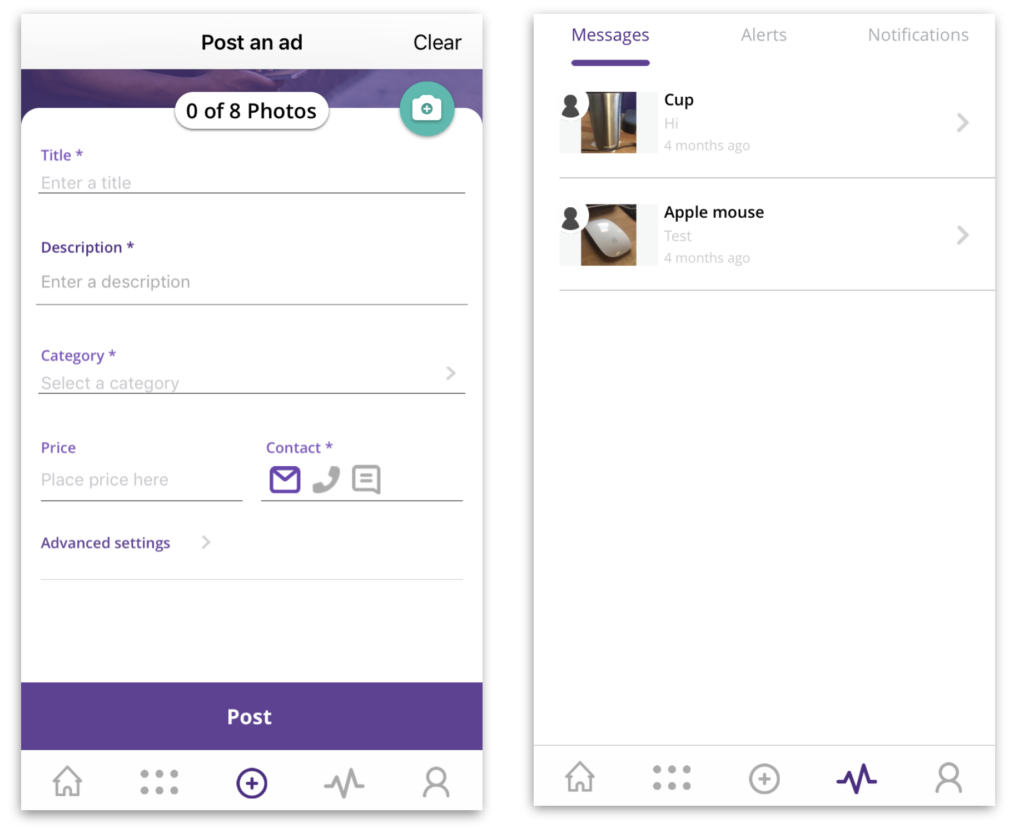
網站每個月有超過五千五百萬的瀏覽次數. 為了更好的服務大量的手機用戶, 在2017年底正式推出手機App. 除了完整呈顯現有網站的功能, 更利用手機本身移動的特性加入新的功能, 如即時通信和即時notification.

設計分享 | Share

當我進入這個團隊第一個任務就是針對現階段的 App 進行 UX Audit, 找出可能的使用痛點和會影響使用者體驗與流暢度的盲點.

接著組織使用者訪談和可用性測試 (Usability Testing), 這當中也密集的與Marketing和Customer service 的人溝通安排適當的人選進行測試.

使用Think aloud protocol來進一步了解使用者在各種操作情境下會遇到的困難和原因, 目的是了解使用者與情境, 也驗證UX Audit時的假設.

最後就是把之前的研究結果集結成報告與內部的團隊討論, 提供改進方案.
主要發現的重大問題舉例有:

  • In-app message 的使用率幾乎為零是因為用戶不了解當張貼廣告時需要將其功能打開才能使用. 如將 In-app meassage 的功能直接內建不需設定打開 能提高用戶使用率. 
  • Tap bar icon 有些用意不明 用戶無法直覺選取 馬上進入想進去的功能頁面  
在這過程中我也了解到公司對app的商業目標是最終可以取代網站. 增加用戶和使用App的頻繁度與停留時間. 與Marketing部門的人溝通了解到過去ㄧ年App在使用者數量上沒有明顯的增長. 經過討論 快速的發現到使用者就算是用手機進入used.ca的網站只會出現手機版的網頁, 並不會提示使用者有App的存在. 當個禮拜只靠增加提示就使App下載量雙倍成長.
**請使用桌機閱讀完整使用者可用性報告

ABOUT

Used.ca is a Canadian classified ads website company established in 2005. Its main feature enables users to post and search for ads. The service is available in multiple cities across Canada, the United States, and the United Kingdom.

With more than 55 million monthly page views, the website attracts a significant number of mobile users. To enhance the user experience for this group, a mobile app was introduced in late 2017. Apart from offering the same functions as the website, the app utilizes smartphone mobility to introduce new features like real-time messaging and instant notifications.

設計分享 | Share

When I joined the team, my first task was to conduct a UX Audit of the current app, identifying potential pain points and blind spots that could affect user experience and fluidity.

Next, I organized user interviews and usability testing sessions, coordinating closely with the Marketing and Customer Service teams to ensure appropriate participants were selected for testing.

We employed the Think Aloud protocol to gain further insight into the difficulties users encountered and the reasons behind them in various operational contexts. The aim was to understand user behavior within different scenarios and to validate assumptions made during the UX Audit.

Finally, we compiled the research findings into a report and held internal team discussions to propose improvement solutions. Some of the major issues discovered included:

The usage rate of in-app messaging was almost negligible because users were unaware that they needed to enable this feature when posting ads. Integrating the in-app messaging feature directly without requiring users to toggle it on could increase its usage.

Some icons in the tap bar lacked clarity in their purpose, making it difficult for users to intuitively select and navigate to the desired functional pages.

During this process, I learned that the company aims to replace the website with the app to boost user acquisition, increase app usage frequency, and extend session duration. In discussions with the Marketing department, I found that there was no notable growth in app users over the past year. We discovered that users accessing the used.ca website via mobile were not being informed about the app. By increasing prompts for a week, we doubled the app download rate.

**Please read the full usability report on a desktop